How to create a conversion funnel in Metixon
Build a funnel from sign-up to purchase: steps by event or by page, a window in hours, and property filters. Its data shows up instantly.
Create a conversion funnel, step by step
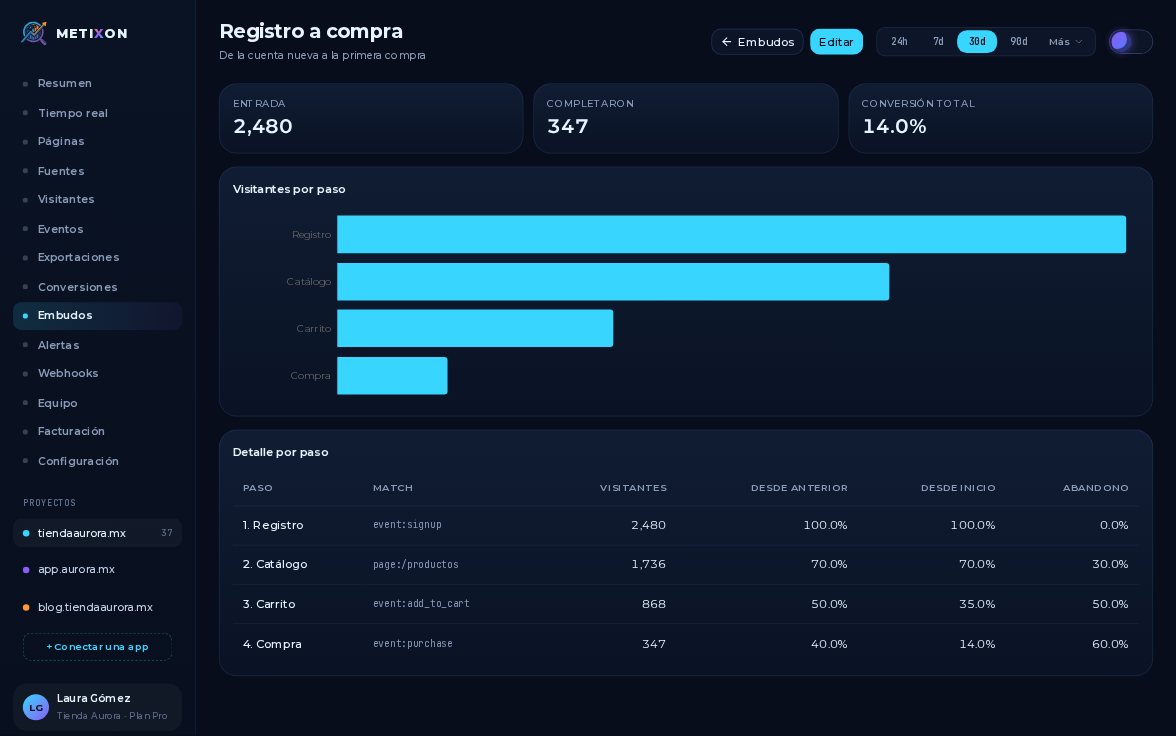
A funnel shows how many visitors move through a series of steps, and where they stop. Let's build one, from sign-up to purchase.
1Create funnel: name, description, and window in hours
In Funnels, click New funnel. The Create funnel window opens.
Give it a name and, if you like, a description. The window is how long each visitor has to finish: one hundred sixty-eight hours is seven days.
2Steps by Page or by Event
Each step has a name and a type. The first is by Event: from your site's events, pick signup.
The second is by Page: change the type and enter the path, here slash productos, the catalog.
The Step button adds more, up to ten. The third is the add to cart event.
3Filter a step by a property
An event step can be filtered by a property. On the purchase, set the first purchase property to true to count only first purchases.
4Save the funnel
Review the steps and click Create. Metixon saves the funnel and takes you straight to it.
It's built from the events you already have, so there's no wait: you see how many visitors reached each step right away.
A name, a window, steps by event or page, and a filter if needed. Your funnel is ready to read.
Frequently asked questions
How many steps can a funnel have?
Up to ten. You start with two and add more with the Step button; each one can be by Event or by Page.
What is a funnel's window?
The time, in hours, each visitor has to complete all the steps. One hundred sixty-eight hours is seven days.
Do I have to wait for new data to see the funnel?
No. It's calculated from the events you already have, so as soon as you create it you see how many visitors reached each step in the selected date range.