How to see where your traffic comes from and track UTMs
Discover your channels and referring sites, track campaigns with utm_campaign and utm_source, and filter your whole dashboard with one click in Metixon.
Traffic sources and UTM campaigns, step by step
Let's see where people come to your site from, measure campaigns with UTMs, and filter your whole dashboard with one click.
1Channels and Referring sites
Channels groups each session by origin: Google, direct traffic, Instagram, Facebook or email. Google brings over a third of your visits.
Next to it, Referring sites shows the exact domain they came from, like google dot com or instagram dot com.
2Campaigns with utm_campaign and utm_source
To measure campaigns, add the utm campaign and utm source parameters to your links. Here are the sessions from Buen Fin and the fall sale.
And Campaign source shows who brought them: Instagram, Facebook or your newsletter. So you know which channel works best for each campaign.
3Countries, devices, browsers, and operating systems
Below, meet your audience: their countries, phone or computer, browser and system. Almost two in three come from mobile.
4One click on a row filters the whole dashboard
Now the best part: click any row and it becomes a filter. Pick Instagram, and every table shows only people who came from there.
The filter shows up top and follows you across the dashboard. In Pages, most landed right on the jacket. To remove it, click the x.
Channels and referrers show where people come from, UTMs measure campaigns, and one click on a row filters the whole dashboard.
Frequently asked questions
How do I track a campaign with UTMs?
Add the utm_campaign and utm_source parameters to your links. Metixon shows each campaign's sessions and who sent them in the Sources section.
What's the difference between Channels and Referring sites?
Channels groups each session by its origin, like Google, Direct, or Instagram; Referring sites shows the exact domain it came from.
How do I filter the dashboard by a source?
Click a row, for example Instagram: it appears as a filter at the top and follows you across the whole dashboard. Remove it with the filter's X.
More from Traffic analysis
 1.1
1.1Customize the Overview with widgets
Narrated 1.2
1.2Filter by date range and segment
Narrated 1.3
1.3See who's on your site in real time
Narrated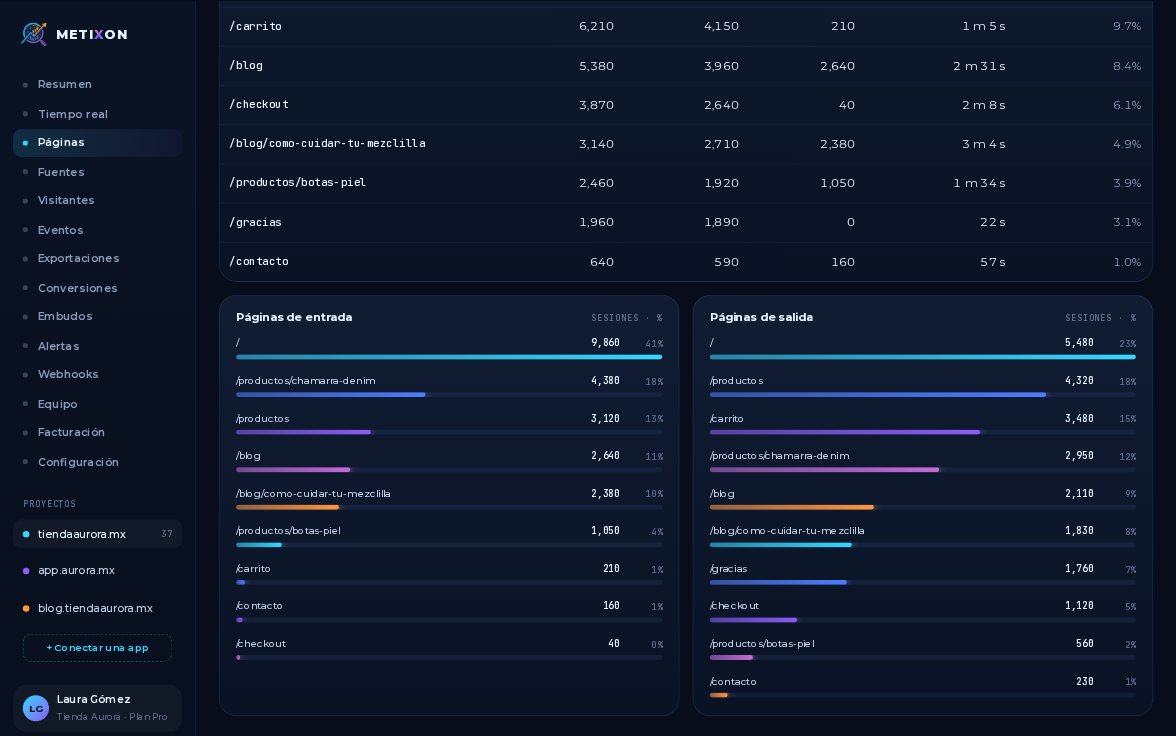 1.4
1.4Find your most viewed pages
Narrated 1.6
1.6